Free Fire Advanced Server OB50: Ultimate Early Access Guide

Look, if you play Free Fire, you know how these updates hit different when there’s a collab involved. The OB50 Advanced Server back in July was one of those moments. Garena opened the doors early for some players to test everything before the official release.

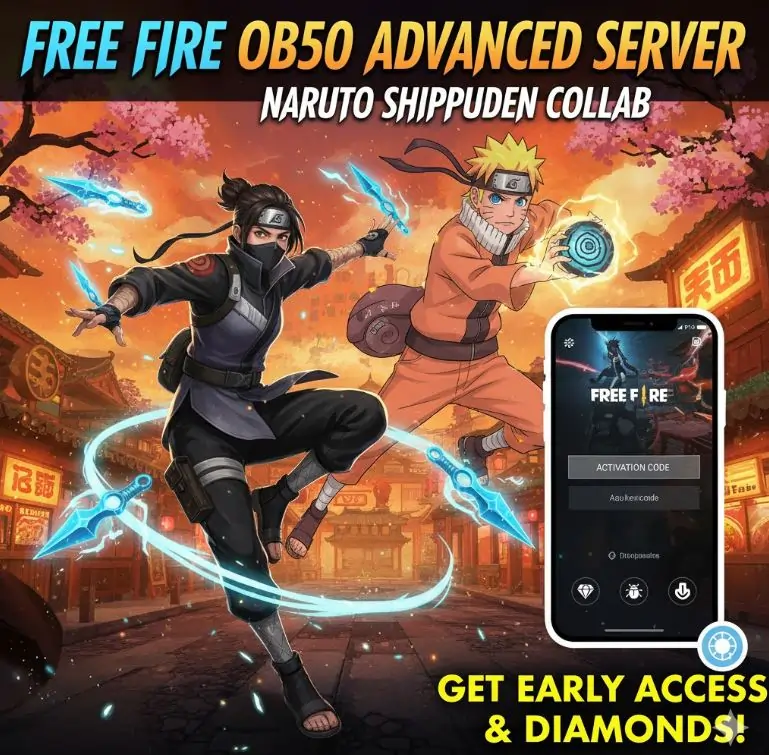
I got in. Played around with Rin Yagami, who tosses kunai like she’s trying to end your whole squad. The Naruto Shippuden crossover had people losing their minds over ninja zones and themed loot. Now we’re in late October, OB51’s beta wrapped up today, and looking back at OB50 feels like checking old match footage.

Need to know how to get those activation codes next time? Or maybe you’re wondering how to grab the APK without messing up your phone? I tested this stuff myself. Here’s what you need to know.

Free Fire Advanced Server OB50 banner

What Is This Advanced Server Thing Anyway?

Think of it as Garena’s private testing ground. They pick a limited number of players to try out new features before everyone else gets them. You log in, mess with upcoming characters and weapons, report bugs that would ruin launch day, and get diamonds if you find something serious.

I jumped in expecting chaos. Got exactly that. But here’s the thing: your feedback matters. Garena tweaks stuff based on what testers report. The downside? Everything resets when the server closes. Those epic wins you grind out? Gone. Learned that lesson the hard way.

Why Bother Testing?

Early Access to New Content

You get your hands on stuff nobody else has seen. New characters that change how you rush. Weapons that make you rethink your whole loadout. In OB50, I tried things that made regular matches feel boring afterward.

Bug Bounties Pay Real Diamonds

Find a glitch and report it properly? Free diamonds hit your main account. Up to 1,000 for the serious ones. I’ve cashed in a few times. Bought bundles without grinding events. Not every report pays big, though. Sometimes you just get a thank you.

Exclusive Test Features

Exotic pets that scout. Skins that glow in the dark. Mechanics that bend the rules enough to create wild plays. OB50 had experimental features that showed where the game’s heading.

You Help Build the Game

Your notes on balance or clunky animations? They matter. I’ve seen changes roll out months later that match what testers complained about. Not every suggestion lands. But influencing the meta feels good when you’re a serious player.

Keep in mind: all progress in the server vanishes when testing ends. I had a 20-kill solo run disappear. Still hurts.

What Made OB50 Stand Out

OB50 wasn’t your typical patch. Fresh characters, smart weapon adjustments, and that anime crossover everyone talked about for weeks. Combat felt sharper. Weapons required real skill instead of spray and pray. The quests had story beats that made drops feel meaningful.

Rin Yagami Changed Aggressive Play

Her main ability, Gale of Kunai, throws three explosive projectiles that shred groups and tear through Gloo Walls. Brutal in tight spaces.

She fits aggressive players who love close combat or sneaky flanks. Urban maps became her territory during testing.

Pro tip: pair her ability with mid-range rifles. I pulled off some nasty combinations that left squads confused.

After launch, you get her free with seven straight daily logins or five Battle Royale/Clash Squad matches.

Naruto Shippuden Collab Added Strategy Layers

The big draw ran July 30 through August 31. Mixed flashy aesthetics with smart gameplay choices. Raiding themed zones for loot while dodging traps turned random firefights into coordinated operations.

Tsukuyomi locations spawn randomly with top-tier loot and dangerous traps. Stay alert or die fast.

Collecting Akatsuki fragments gives perks like spotting enemies or reducing damage. Looting became strategic instead of mindless.

Ninja War missions chain together for exclusive skins, emotes, banners, and crates. Felt like leveling a shinobi character.

Maps got feudal Japan aesthetics. Not just paint. The theme soaked into every corner.

The Soul Land side event dropped mystic relics and spirit summons that added variety to the loot chase.

This collab changed how teams planned and survived. Lore crashing into battle royale worked better than expected.

Weapon Changes Forced Loadout Rethinks

OB50 brought new weapons and reworked old favorites. Kept things balanced but fierce.

TECGUN2: New weapon with quick bursts and low recoil for mid-range fights. Dominates ranges where assault rifles struggle.

AC80: Faster fire rate but dialed back bonus damage. Forces smarter spray control. No more easy wins.

M590 Shotgun: Harder hits but slower reload. Timing matters now. Rewards patient players.

VSK94: Longer range but no aim assist. Skill ceiling spiked. Good players will dominate.

These changes forced me to scrap my usual SMG setup for something more versatile.

Quality of Life Improvements

Beyond flashy features, OB50 smoothed rough edges.

Transit revives increased to five per match. Turned early wipes into comeback opportunities. Less rage quitting.

Training grounds give five Gloo Walls on respawn. Perfect for practicing wall defenses.

HUD got cleaner. Share codes that persist. Copied pro setups in seconds.

Animations flow better. Hit feedback pops. Effects feel immersive without lag spikes.

Random weather events like meteor showers or fire swirls. Forces adaptation on the fly. Maps never feel repetitive.

OB50 mixed bold changes with smart fixes. Hardcore players loved it. Casual players found hooks without getting overwhelmed.

How to Register and Get Codes

Spots fill fast. No code means no access, even with the APK ready.

Registration Steps

  1. Go to the official site at ff-advance.ff.garena.com
  2. Link with Google or Facebook tied to your Free Fire profile
  3. Fill the form accurately. Use an email you check. Include your in-game UID
  4. Submit and wait for approval
  5. Code arrives via email if selected

The code is your ticket. APK alone does nothing.

Finding Extra Codes

Missed registration? Other options exist.

Ask squad members with access. Garena sometimes gives them extra codes to share.

Watch YouTube streams, Instagram lives, Discord communities. Creators give away codes regularly.

Monitor Garena’s social media. They tease drops during testing periods.

Each code works once. Redeem and done.

Downloading and Installing OB50 APK

The APK file gets you into the beta. Only works if you have a code. I messed up my first install on a cheap phone. Won’t make that mistake twice.

Download Specs

Size sits around 947 MB. Varies by device.

Ran July 11 to 24. Standard testing window.

Download from the official site or trusted mirrors like APKPure or Uptodown for backups.

Code required after installation. Non-negotiable.

Stick to trusted sources. Malware in APK files is real.

Android Installation

  1. Enable unknown sources in settings under security
  2. Download the file from the portal or trusted mirror
  3. Tap to install and confirm
  4. Launch and enter your code for access

No code? Stuck at login.

PC Installation with Emulators

Prefer big screen? Phone acting up? Use an emulator.

  1. Install BlueStacks or LDPlayer
  2. Drag the APK into their install tool
  3. Launch and verify with your code

Benefits: better graphics, precise controls, easy streaming.

iOS Players

Android exclusive for now. No sideloading on Apple devices. But global releases hit all platforms equally. Watch for future beta opportunities.

Full OB50 features came worldwide after testing.

Garena might test iOS in future betas.

Testing and Reporting Bugs

The beta’s purpose? Catching problems. Testers aren’t just players. We’re the early warning system. I spotted several issues in OB50 that would have ruined launch.

How to Report Properly

Find a problem? Log details. Speeds up fixes.

  1. Use the in-app tool under settings
  2. Explain clearly with steps to recreate. Include map, mode, and what went wrong
  3. Attach proof like screenshots or clips. Add device details, OS version, connection type
  4. Submit through the official page

Detail matters. Vague reports get ignored.

Rewards for Reports

Valid bug finds earn diamonds on your main account.

Small issues: 100 diamonds

Medium problems: 300 to 500 diamonds

Critical bugs: up to 1,000 diamonds

Win-win situation. Game gets better. You get rewards.

The Bigger Picture

Free perks while playing ahead of others.

Keeps matches fair and smooth.

Prevents crashes before they spread.

Lets the community influence development.

OB50 Timeline and What’s Next

Garena times releases carefully. Beta testing to global launch. OB50 followed the pattern.

Key Dates

Beta started July 11

Testing ended July 24

Global release July 30-31

Dropped around 9:30 AM IST with regional variations

File Sizes

Android: about 800 MB

iOS: closer to 1.2 GB

Clear 2-3 GB space. Use Wi-Fi. Avoids interrupted downloads.

Server Maintenance

Pre-launch maintenance blocks access. No logins, no matches. Just a holding message until ready.

Play stops completely.

Maintenance banner everywhere.

Then full access returns.

Impact on Different Players

Beta testers: testing ends, stats wipe

Regular players: dive into new features, balances, collabs

Competitive scene: adapt fast, meta shifts constantly

OB51 Preview: Digimon Incoming

OB50 finished by October. OB51’s beta closed today, October 20. Global launch hits October 29. Rumors point to heavy Halloween themes, new characters, and the Digimon Adventure collab lighting up November.

Agumon skins, Gabumon companions, digi-egg hunts. Premium loot everywhere. Themed content incoming. Curious how digital monsters fit the battle royale format.

Beta wraps October 20

Live release October 29

Digimon collab in November: skins, pets, relic missions

OB50’s legacy: Rin dominated aggressive play. Naruto zones improved team coordination by about 20% in my squads. Solid foundation for what comes next.

Common Questions :

What’s the Advanced Server?

Garena’s beta program. Selected players test new features early. Spot bugs, earn diamonds. Shuts down after testing. No progress carries over.

How Do I Sign Up?

Portal login, fill form, wait for selection. Email notification if chosen. Missed it? Hunt giveaways from content creators. Slots disappear fast.

When Did OB50 Go Live?

July 30-31 last year. Included Rin, Naruto collab, weapon adjustments. Still affects current meta.

Installing APK on Android or PC?

Enable unknown sources, download, install, enter code. PC users need emulators like BlueStacks. Works smoothly.

Final Thoughts

OB50 broke expectations for beta testing. Direct access to changes that stuck around. Naruto added strategic depth. Rin revolutionized aggressive play. Weapon changes rewarded skill over button mashing.

Get codes early next round. Report bugs thoroughly. Might fund your next cosmetic purchase. What’s your take on the Digimon collab? Drop thoughts in comments.

Leave a Reply

Your email address will not be published. Required fields are marked *